The answer rarely sits in the software. Most partner portal best practices conversations focus on what to buy. Almost none focus on what happens between the purchase order and the first successful login, which is usually where the real damage gets done.
What Partner Portal Implementation Actually Requires Before Launch
Evaluation criteria get all the attention. Integration depth, CRM sync, SSO, deal registration workflows- these are the questions vendors are told to ask before they buy. They matter. But they answer a different question than the one that actually determines whether a portal succeeds: not “did we pick the right platform,” but “did we get it in front of partners in a way they could actually use.”
A sound platform choice is a precondition, not a guarantee. Partner portal implementation is where that choice either becomes partner behavior or it doesn’t. Treating launch as a technical switch-flip, rather than a program rollout with its own planning, is a common reason portals that passed every evaluation checklist still sit underused six months in.
The Partner Portal Implementation Checklist: Data and Content Readiness
Before a single partner gets a login, three things need to be true.
Partner data is clean, not just migrated. Duplicate records, outdated contact info, and incomplete partner profiles don’t disappear in a data migration, they just move to a new system. Reconcile the partner list against what’s actually accurate before go-live, not after partners start reporting it back as a bug.
Content exists on day one. A partner who logs in to an empty resource library, with placeholder text or “coming soon” tiles, forms their opinion of the portal in that first visit. Sales collateral, onboarding materials, and program documentation need to be populated before launch, not rolled out in phases alongside the partners themselves.
Workflows are tested with real scenarios. Walk through deal registration flows, approval chains, and role-based permissions as a partner would experience them, not just verify them from an admin view. An admin login hides problems a partner login exposes immediately.
Build the Communication Plan Before the Technical One
Partners don’t need to know a new portal exists. They need to know why it exists, what changes for them day-to-day, and what they’re expected to do differently.
A technical rollout plan answers when systems go live. A communication plan explains why it matters to the partner reading the email.
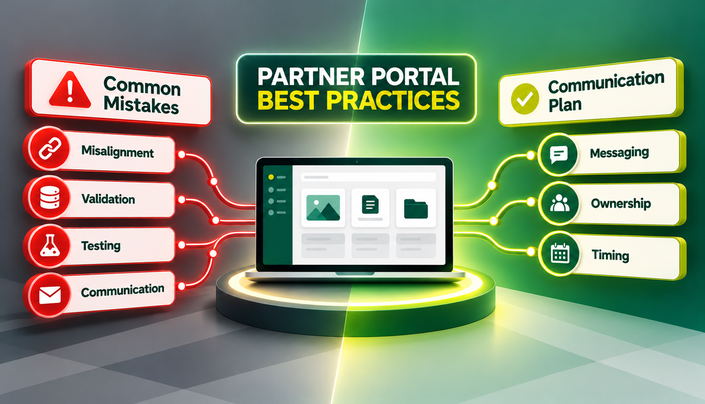
What the plan needs to cover:
- The message: why this change, what’s in it for the partner, not just what’s new
- The messenger: a program-wide announcement, a personal note from the account manager, or both
- The timing: how far ahead of go-live it lands, a single email or a short sequence
Why a Phased Partner Portal Rollout Beats a Big-Bang Launch
Pushing a new portal to the entire partner base on the same day feels efficient. It’s usually the most expensive way to discover what’s broken.
A phased partner portal rollout starts with a small, representative pilot cohort, a mix of partner types and activity levels, not just the most engaged accounts.
What the pilot typically surfaces:
- Where support tickets cluster
- Where partners drop off mid-registration
- Where instructions assume knowledge partners don’t actually have
Those findings shape the full launch instead of becoming its postmortem. A big-bang partner portal launch turns each of those problems into a simultaneous support load across the partner base, at the exact moment first impressions are forming.
Designing Partner Onboarding to a New Portal: The First 10 Minutes
The first ten minutes of a partner’s first session carry more weight than almost anything else in the rollout. A confusing first login rarely gets a second chance.
What a strong first session includes:
- A guided first path, not a blank dashboard
- One small task the partner can complete immediately: update a profile field, register a deal, find a specific resource
- Training delivered at the moment of login, not buried in a help center nobody visits until something’s wrong
A completed action in that first session builds the habit a welcome banner never will.
What to Watch in the First 90 Days
A handful of early indicators say more than a full dashboard of metrics at this stage.
- Login completion rate: partners who received credentials and actually completed a first login, not just received an invite
- Time to first action: how long between login and the first meaningful task completed inside the portal
- Support ticket volume and pattern: a spike is expected in week one; what matters is whether the same issue keeps recurring past week three
These numbers won’t tell the whole adoption story. They will quickly tell you whether the launch itself worked.
Common Partner Portal Launch Mistakes to Avoid
- Treating go-live as an IT milestone instead of a partner-facing program change
- Migrating data without reconciling it first, moving bad records into a system partners now trust by default
- Launching to the full partner base before a pilot group has surfaced the obvious problems
- Leaving content and collateral to be filled in “after launch”
- Assuming a welcome email counts as a communication plan
Where Vartopia Fits Into a Partner Portal Launch
Three of the areas discussed above are where an ecosystem platform like Vartopia tends to make a real difference: content readiness, the first login, and the rollout itself.
Content readiness. Content Library gives vendors a dedicated, partner-aware hub for sales and marketing assets, with co-branding handled once at the template level rather than built per partner by hand. That’s the difference between partners logging into an empty resource section on day one and partners finding something immediately usable.
The first login. Vartopia SSO and Directory Integration lets partners sign in with the credentials they already use at their own company, with no separate Vartopia password to issue, remember, or reset. New hires on the partner side get access automatically when their own IT team adds them to the right group, and departures lose access the same way. The login friction this post spends an entire section on is, for partners on this setup, mostly removed before it starts.
The rollout itself. Vartopia’s Implementation Services team works through the launch plan directly with vendors, rather than handing over a platform and leaving rollout sequencing, migration, and partner communication timing to be figured out internally.
None of this replaces the planning covered above. A clean implementation plan still has to exist. Vartopia just removes a few of the places where that plan usually breaks.
Getting the Launch Right
A partner portal earns its return on the days partners actually use it, not the day it goes live. The platform decision gets the attention. The weeks around launch, data readiness, communication, a phased rollout, and a first session that actually works, decide whether that decision pays off.

If you’re planning a rollout or inheriting a launch that didn’t land the way it should have, the Vartopia team can talk through where things stand. Book a demo